VartaFlow Contact Sources Explained: WhatsApp Inbound, App Echo, MTF, CSV, and WooCommerce
As your WhatsApp contact list grows, a phone number alone does not tell your team enough. To respond effectively, sales and support teams also need context: Did the customer message first? Was the contact entered by an employee? Did it come from an imported database or an online order?
VartaFlow’s Source field answers that question by showing how a contact or activity entered the platform.
You may see five common source labels in VartaFlow:
whatsapp_inboundwhatsapp_app_echoMTFCSVWooCommerce
Understanding these labels helps teams prioritize enquiries, organize contacts, create relevant automations, and build clearer customer journeys. This guide explains what each source means and how to use it.
What Is a Contact Source in VartaFlow?
A contact source identifies the route or process through which a contact entered VartaFlow.
In simple terms, it answers:
How did this contact get into VartaFlow?
One person may message your business directly on WhatsApp. Another may be added manually after a phone call. Existing customers may be imported from a CSV file, while online shoppers may enter through a WooCommerce integration.
These contacts may all be valuable, but they arrived through different workflows. The Source field makes that distinction visible.
1. What Does whatsapp_inbound Mean?
whatsapp_inbound means that the contact was created or identified through an incoming WhatsApp interaction initiated by the customer.
For example, a prospect might send:
Hi, I’m interested in your service. Could you share more details?
When VartaFlow receives that message, the contact may display:
Source: whatsapp_inbound
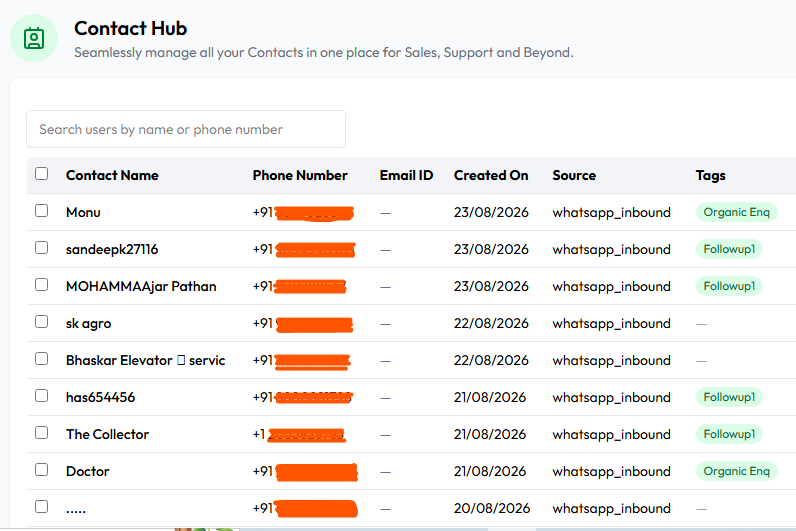
Where might an inbound WhatsApp enquiry begin?
A customer could discover your WhatsApp number through:
- Your website
- Google Search or a Google Business Profile
- Facebook or Instagram
- A click-to-WhatsApp advertisement
- A QR code
- Offline advertising
- A referral
- A previously saved contact
There is an important distinction: whatsapp_inbound identifies the customer’s immediate route into VartaFlow, not necessarily the marketing channel that first generated the lead.
For example:
Google Ad → Website → WhatsApp button → Customer sends a message
VartaFlow may record the source as whatsapp_inbound, while Google Ads remains the original acquisition channel. For more accurate attribution, use the Source field alongside tags, campaign data, and tracking parameters.
2. What Does whatsapp_app_echo Mean?
whatsapp_app_echo identifies WhatsApp activity that has been echoed or synchronized from the connected WhatsApp environment into VartaFlow.
The simplest way to distinguish the two WhatsApp-related labels is:
whatsapp_inbound: a customer-originated incoming interactionwhatsapp_app_echo: activity reflected from the connected WhatsApp setup

This classification helps VartaFlow maintain conversation continuity and distinguish synchronized activity from a normal inbound customer message.
Is whatsapp_app_echo a marketing source?
No. It is primarily a technical or system-level classification. It should not be interpreted like Google Ads, Meta Ads, a website enquiry, or another acquisition channel.
To understand what originally brought that customer to your business, refer to campaign information, contact tags, CRM records, or attribution data.
3. What Does MTF Mean?
In VartaFlow, MTF stands for Manual Through Form. It indicates that a team member manually added the contact through a contact form.
This may happen when a sales executive receives a prospect’s details through:
- A phone call
- An exhibition or trade show
- An offline enquiry
- A referral
- Another legitimate business channel
The record may then display:
Source: MTF
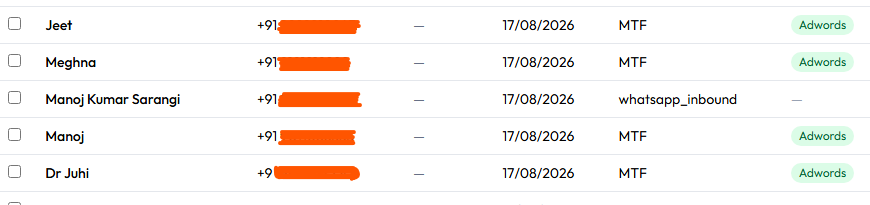
MTF explains how the record was added to VartaFlow. A tag can provide the extra business context:
- Source: MTF · Tag: Google Ads
- Source: MTF · Tag: Exhibition Lead
- Source: MTF · Tag: Follow-Up
This combination helps teams preserve both operational and marketing context.
4. What Does CSV Mean?
CSV means that the contact entered VartaFlow through a CSV file import.
CSV, short for comma-separated values, is a common format for moving structured data between spreadsheets, CRMs, billing platforms, and other business applications.
The process typically looks like this:
Existing customer database → CSV file → VartaFlow
Imported records may display:
Source: CSV
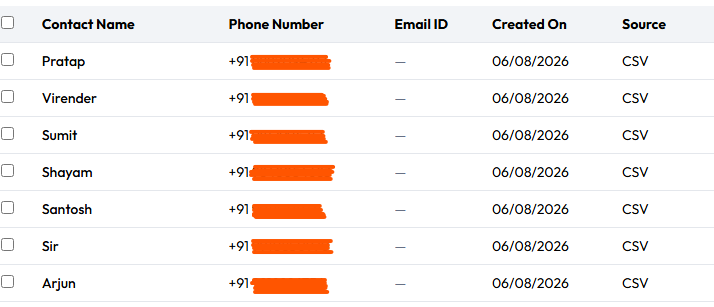
When is a CSV import useful?
Businesses may use it to migrate:
- Existing customer records
- Opted-in marketing contacts
- Previous enquiries
- Contacts from another CRM
- Event or campaign databases
Importing a phone number does not automatically give a business permission to send marketing messages. Maintain appropriate consent and opt-out records, and follow the WhatsApp requirements and applicable laws relevant to your business and customers.
5. What Does WooCommerce Mean?
WooCommerce indicates that a contact entered VartaFlow through a connected WooCommerce store or an associated integration workflow.
The journey may look like this:
Customer places an order → WooCommerce → VartaFlow → WhatsApp communication
The contact may display:
Source: WooCommerce

Depending on your configuration, permissions, and approved messaging workflows, this connection can support communications such as:
- Order confirmations
- Payment notifications
- Shipping and delivery updates
- Customer support
- Post-purchase engagement
- Relevant follow-ups
The key benefit is context. Your team sees not just a phone number, but a contact connected to an eCommerce journey.
VartaFlow Contact Sources at a Glance
| Source | Meaning | How the contact or activity enters VartaFlow |
|---|---|---|
whatsapp_inbound |
Incoming WhatsApp interaction | The customer initiates a WhatsApp conversation |
whatsapp_app_echo |
Synchronized WhatsApp activity | Activity is echoed from the connected WhatsApp environment |
MTF |
Manual Through Form | A team member adds the contact through a form |
CSV |
CSV file import | The contact is imported from an existing database |
WooCommerce |
WooCommerce integration | The contact enters through a connected store workflow |
Why Contact Source Matters
Understand how contacts enter your system
Instead of managing an unexplained list of phone numbers, your team can distinguish direct WhatsApp enquiries, manually entered prospects, imported databases, and eCommerce contacts.
Prioritize new enquiries
A whatsapp_inbound contact has actively started a conversation and may need an immediate response. A CSV-imported record may belong to an existing customer segment and require a different communication strategy.
Create source-aware workflows
Contact sources can provide useful context for automations such as:
- WhatsApp inbound → Welcome message → Lead qualification → Sales assignment
- WooCommerce → Order workflow → Customer update → Support or follow-up
- MTF → Assign executive → Add tag → Schedule follow-up
The exact workflow depends on your setup, but the Source field gives the automation a clearer starting point.
Build more relevant segments
Combine Source with other information, including:
- Tags
- City or location
- Product interest
- Customer type
- Campaign
- Lead stage
- Purchase history
- Previous conversations
This creates more useful segments for sales, support, and customer engagement.
Source vs. Tag vs. Original Lead Source
These fields answer different questions and should not be treated as interchangeable.
Imagine a customer sees a Google Ad, phones your sales team, and is then entered manually into VartaFlow. The record might show:
- Source: MTF
- Tag: Google Ads
Here, MTF shows how the record entered VartaFlow. The tag records how the business classifies or attributes the lead.
Similarly:
- Source:
whatsapp_inbound - Tag: Follow-Up
This means the person entered through an incoming WhatsApp interaction and was later categorized for follow-up.
For meaningful reporting, use Source to understand the entry method and campaign or CRM data to understand the original acquisition channel.
Turning Contact Sources into Customer Journeys
Contact-source data becomes most valuable when teams act on it.
VartaFlow can help businesses bring incoming WhatsApp enquiries, imported contacts, eCommerce data, tags, follow-ups, team conversations, and CRM processes into more structured workflows. When each contact carries the right context, teams can decide what should happen next more quickly and consistently.
The result is a clearer journey from first contact to conversation, follow-up, support, and conversion.
Frequently Asked Questions
What does whatsapp_inbound mean in VartaFlow?
It indicates that a contact was created or identified through an incoming WhatsApp interaction initiated by the customer.
What does whatsapp_app_echo mean?
It identifies WhatsApp activity echoed or synchronized into VartaFlow from the connected WhatsApp environment. It is mainly a technical classification, not a marketing attribution source.
What is MTF in VartaFlow?
MTF stands for Manual Through Form. It means a team member manually added the contact using a form.
What does CSV mean as a contact source?
It means the contact was added through a CSV file import, usually from an existing customer, lead, or CRM database.
What does WooCommerce mean as a contact source?
It indicates that the contact entered VartaFlow through a connected WooCommerce store or related workflow.
Are Source and Tag the same?
No. Source shows how a contact entered VartaFlow. Tags let a business classify the contact by campaign, interest, lead stage, follow-up status, or another internal category.
Can a whatsapp_inbound contact originate from Google or Meta Ads?
Yes. whatsapp_inbound describes the immediate incoming WhatsApp interaction. The person may originally have discovered the business through an ad, website, social platform, QR code, referral, or another channel.
Turn Every Contact Source into a Smarter Journey
Not every contact reaches your business in the same way, so every contact should not automatically receive the same next step.
A person who messages you directly may need an immediate reply. A WooCommerce customer may need order updates. An MTF lead may require a scheduled sales call, while an opted-in CSV contact may belong to an existing campaign segment.
By identifying sources such as whatsapp_inbound, whatsapp_app_echo, MTF, CSV, and WooCommerce, VartaFlow gives teams clearer context. Combine that context with tags, automation, CRM data, and campaign tracking, and your contact database becomes far more actionable.
Want Smarter WhatsApp Lead and Contact Management?
With VartaFlow – WhatsApp Automation API, businesses can capture leads, import contacts, connect business systems, automate follow-ups, manage conversations, and organize customer journeys in one connected platform.
Request a VartaFlow demo to discover how better contact management can turn more conversations into business opportunities.